MIDI Oracle is an AI MIDI generator that reads every track in your REAPER project and generates or edits MIDI directly inside it — fix a timing issue, correct a note range, score a full orchestra, or generate a complete multi-track arrangement. No export, no copy-paste, no switching apps. Just describe what the music needs.
MIDI Oracle understands the full orchestra — ranges, articulations, and how every part relates to the others. This video puts that knowledge under stress: all four sections simultaneously, each staying in range and switching articulations correctly. The point isn't the output. It's what the tool had to understand to produce it.
MIDI Oracle is an AI MIDI generator you can use to fix a note, clean up a session, sketch an idea before committing, or build a full arrangement from scratch. How you use it — and how far you push it — is entirely up to you.
Real demos showing what MIDI Oracle can do for your music.
All four sections simultaneously, each staying in range and switching articulations correctly. The point isn't the output — it's what the tool had to understand to produce it.
Drop a complete drum stem into REAPER and let MIDI Oracle do the work. Finds every loop, spots every repeated section, deconstructs it into labelled items with pooled ghost duplicates.
Four string parts rewritten for solo piano — voicings across two hands, physical reach, how the music should feel at the keyboard. Composed for the instrument, not assembled from parts.
Drum Oracle builds verse, chorus, fills, and transitions — recurring sections as pooled ghost items. MIDI Oracle then adds a bass line that locks into the groove.
Sloppy timing, uneven lengths, inconsistent velocities, one note outside the violin's range. Used to mean several scripts in sequence. Here it takes one instruction.
A full retro 80s game theme from scratch — synth bass under a pad, lead in the right register, groove holding everything together. Genre knowledge, not just note generation.
Play a short motif and ask MIDI Oracle to take it further. It reads the melodic shape and harmonic context, then extends it in a way that feels like a natural continuation.
Select any MIDI item and transpose it — up a fifth, down a semitone, into a new key entirely. Useful for modulations, fitting a part to a singer's range, or trying a phrase in a different colour.
MIDI Oracle is an AI MIDI generator and editor that operates your project directly — fixing, editing, reshaping, composing, and arranging MIDI in your DAW in response to plain-language instructions, with full awareness of everything already in your project. No export, no copy-paste, no switching context. Every note lands as standard editable MIDI. Keep what works, change what doesn’t, or throw it away entirely.
The Oracle has full awareness of your project state — selected tracks, the instrument plugin on each track, selected items, time selection, cursor position, markers, folder hierarchy, drum map, and the full tempo map — so you never have to explain it. Just say what needs to happen next.
No copy-paste, no export, no browser tab. MIDI Oracle makes the change in REAPER — writing new material, editing existing notes, splicing sections, or restructuring what's there. If it needs to clarify something first, it asks you before touching anything.
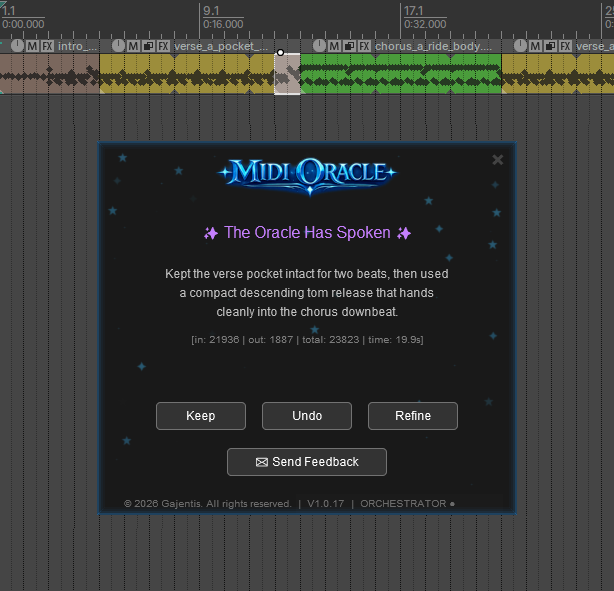
Hear the result, then decide. Hit Keep to commit, Undo to revert cleanly, or Refine to give the Oracle a follow-up instruction.
I’m a software architect by profession — I’ve been writing code since I was 7. When I kept reaching for a different script every session — one to quantize, one to humanize, one for velocities, one to correct note ranges, one to change key… — I had both the frustration and the means to do something about it properly. Each script did one mechanical thing and none of them understood what the music was actually doing.
Under the hood MIDI Oracle uses AI, which is what lets it understand your music rather than just operate on the data. Once it could handle any MIDI editing task I could throw at it, composition and arrangement followed naturally — because a tool that truly understands music can do both. Early testers put it to work in ways I hadn’t anticipated: sketching a guide track for session players, rewriting a guitar piece for strings, hearing a chord idea before committing to it, roughing out a drum arrangement before touching the kit. REAPER users are musicians — people who are actively involved in every note, every decision. This tool puts more capability in their hands, not less.
In practice, I use it exactly as I built it — to handle whatever the music needs next, whether that’s cleaning up a recording, reshaping a phrase, or building something new from the ground up. I update it regularly, and every improvement ships to you automatically.
You have the musical knowledge. MIDI Oracle has the range and speed to act on it. Sketch a guide track for session players, hear a chord idea before you commit, roughing out a structure before you track live parts, rearranging for a different ensemble — describe what you need and it builds it directly inside your project.
Rewrite a piano piece for strings, brass, or woodwind — adapting to each instrument's range, character, and idiomatic playing style while preserving the original feel. MIDI Oracle understands what the music is doing, not just where the notes are.
"Add a bass line that locks to the drum groove and follows the chord changes on the piano." MIDI Oracle reads every track in your project and writes each new part in context of everything already there.
"Give this groove a jazz feel." "Make this string writing feel more like late Romantic orchestration." Genre, idiom, era, ensemble character — describe the sound you're after and MIDI Oracle works toward it.
A script quantizes everything. MIDI Oracle reads what you played, identifies which late notes were expressive decisions, and corrects only the ones that weren't. The feel stays. The mistakes go.
"Tighten the timing, humanise the velocities with more weight on the downbeats, fix any out-of-range notes, and smooth the legato transitions." One instruction handles all of it — save it, name it, and run it on anything.
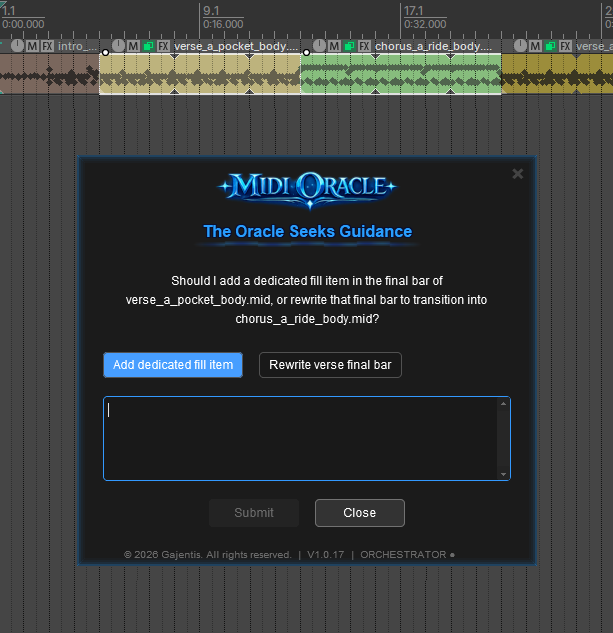
When an instruction could go in more than one direction, MIDI Oracle pauses and asks — with multiple-choice options or free text. It never makes assumptions on material it isn't sure about.
Ask for a melody line, a chord progression, or a bassline that locks to your groove and follows the changes — MIDI Oracle generates it as an AI MIDI melody, chord, and bassline generator, writing the result directly into your REAPER project.
From a single edit to a full arrangement — the scope is always yours to set.
If you rely on REAPER MIDI Lua scripts for quantizing, humanizing, or chord and arpeggio generation, MIDI Oracle replaces them with one AI instruction. Below is every category of MIDI operation those scripts have been written to solve — and what MIDI Oracle, acting as an AI MIDI quantizer, humanizer, and generator, does with each.
Every script you ever used was an attempt to put musical intent into code. MIDI Oracle lets you write the intent directly.

MIDI Oracle is fully aware of your project — selected tracks, instruments, selected items, time selection, cursor position, markers, and the full tempo map. Tell it what you need in plain language and it acts on exactly the right parts.

When an instruction could reasonably go in more than one direction, MIDI Oracle pauses and asks — with multiple-choice answers or a free-text response. You answer, it acts. No guesswork, no wasted generations.

No export. No clipboard. No context switch. MIDI Oracle writes new material, edits existing notes, and restructures sections directly inside REAPER — every result in the right place, at the right time.

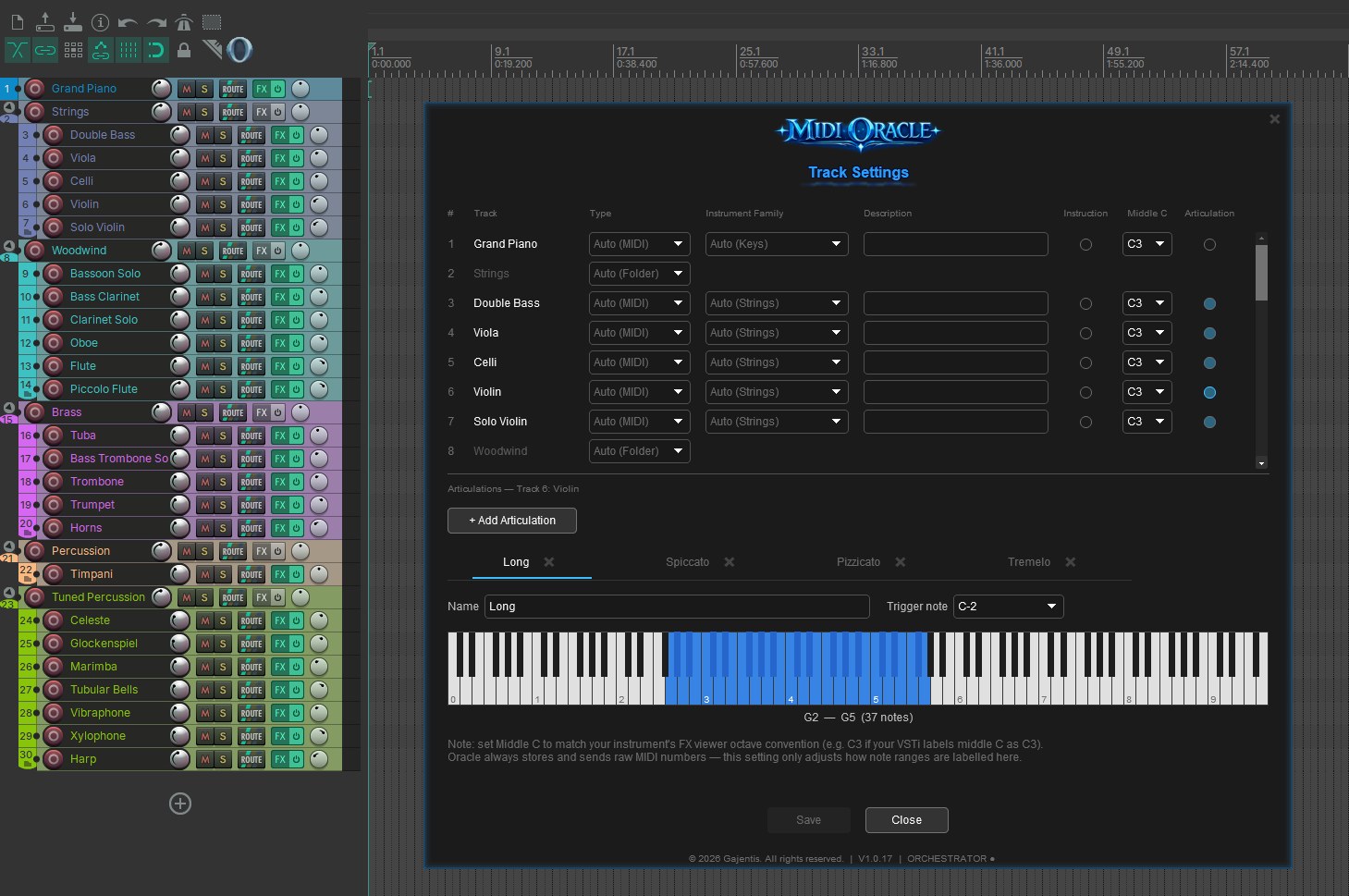
Define the physical note range, standing instructions, and full articulation map for every track — Legato, Spiccato, Pizzicato, Tremolo, and more, each mapped to its own keyswitch note. MIDI Oracle reads this before writing a single note, so the right articulation fires at the right moment and nothing ever plays outside the instrument’s range.

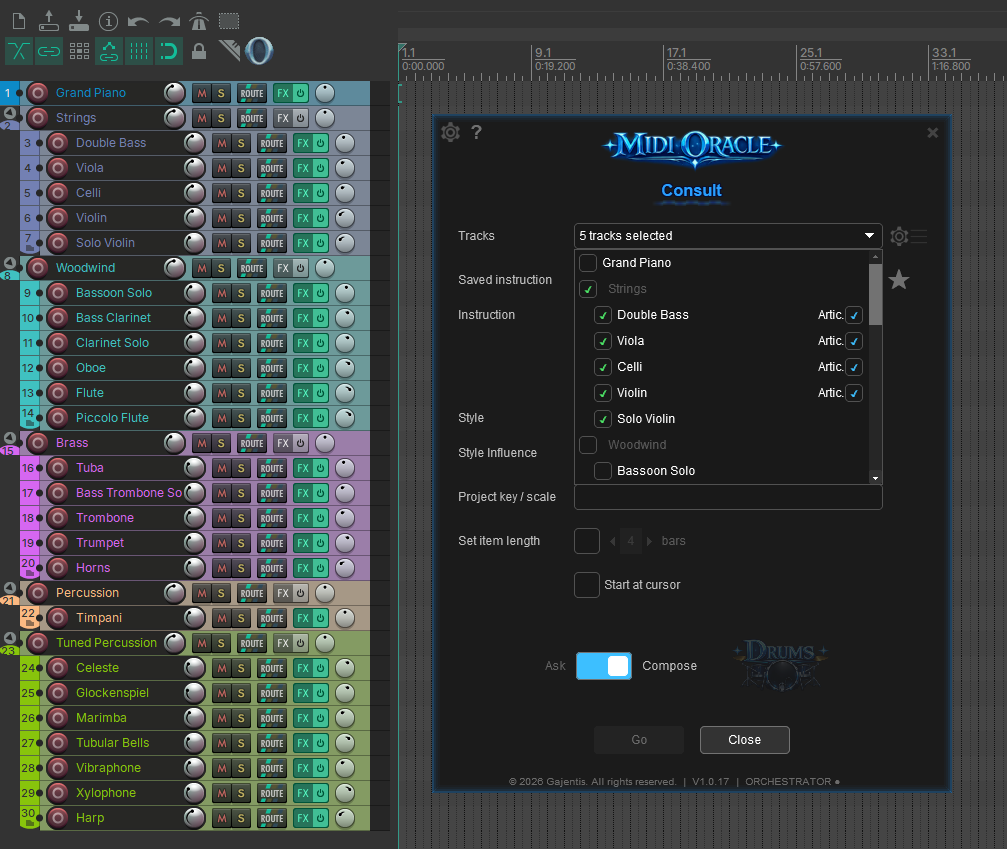
The track picker shows your entire project hierarchy — folder groups, nested instruments, and articulation layers — so you can include exactly the right parts in any generation. Nothing gets buried, even in a full orchestral template.

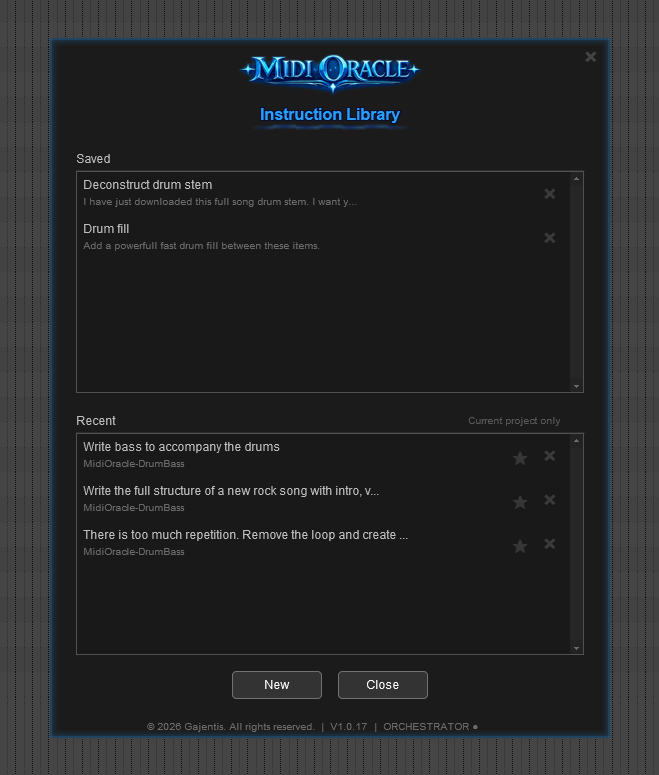
Every instruction you’ve sent stays in the project history — browse it, re-run it, or add it to your saved instructions for quick easy access in any session
Fix a recording, polish a performance, rearrange for a different instrument, or build something from scratch — MIDI Oracle is fully aware of your project and understands the music, not just the data.
MIDI Oracle has full awareness of your project — selected tracks, the instrument plugin loaded on each track, selected items, time selection, cursor position, tempo map, drum map, and every note on every included track. You never have to tell it where to look.
Fix timing, humanize velocities, correct note ranges, clean up overlaps, reshape a phrase, cut and replace a region — the same interface handles all of it. One instruction can replace a chain of scripts, and there is no separate mode for editing versus generating.
Scripts apply rules to MIDI bytes. MIDI Oracle understands what the music is actually doing — key, groove, phrase shape, and performance intent. That is why it can preserve intentional timing pushes while correcting mistakes, or accent downbeats rather than applying random velocity offsets.
Build a library of named, plain-language instructions. Every entry is human-readable, editable without touching any code, and shareable with any collaborator. One click reruns any saved instruction on any item in any session.
Drop a MIDI stem in and ask MIDI Oracle to analyse it — it finds the loop points, identifies every repeated section, and restructures the whole thing as correctly-sized items with recurring sections linked as pooled ghost items. Edit the source and every copy updates instantly. When generating new content, MIDI Oracle creates the same structure natively.
When an instruction could go in more than one direction, MIDI Oracle pauses and asks — with multiple-choice options or free text. After any result, follow-up instructions refine what it did without repeating context. Every instruction in a session carries forward.
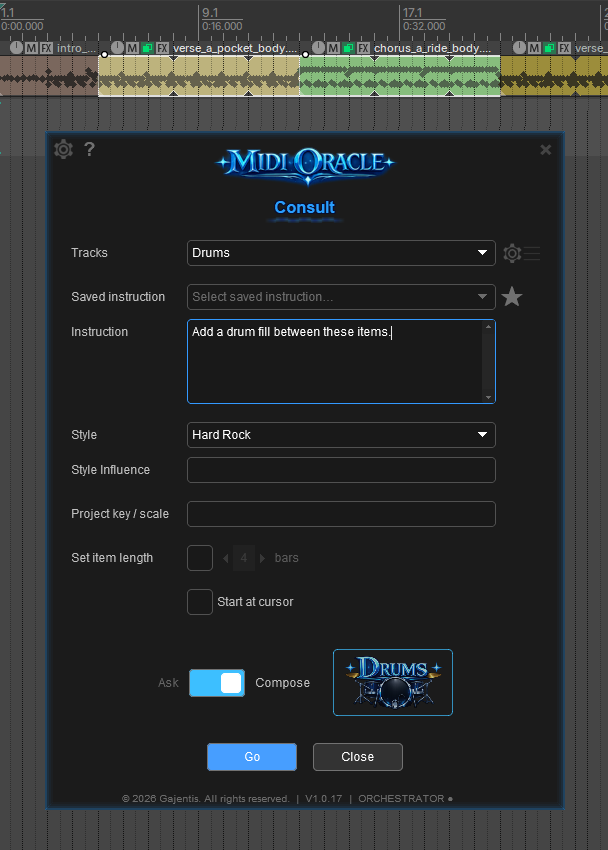
Tell Drum Oracle what you need — genre, sections, feel — and it executes as an AI MIDI groove generator. Start from scratch and direct the full structure: verse grooves, chorus lifts, fills, and transitions. Hand it an existing stem and tell it what to add or change. It reads your REAPER drum map automatically and places every item exactly where it belongs.
Describe what you want and MIDI Oracle composes across multiple instrument tracks simultaneously — every part written in context of the others. Oracle supports up to 8 tracks; Orchestrator scales up to 36.
Configure each instrument track once — its physical range and full articulation map. As an AI MIDI orchestration plugin, MIDI Oracle never writes a note outside the instrument's limits and switches articulations automatically, firing the correct keyswitch at the start of every passage — whether editing existing material or generating something new.
These features are in active development. Each one requires new REAPER integration that goes beyond what instructions alone can do.
Ask the Oracle to analyse your project and mark it up — key changes, section boundaries, tension peaks, rhythmic landmarks. Navigate your session the way a human producer would label it.
Describe the shape and feel of a movement and the Oracle writes the automation for you — volume rides, filter sweeps, panning arcs — placed exactly where the music needs them.
The Oracle adds expressive detail — mod wheel, vibrato, breath, expression — sculpted to the phrasing of your MIDI. The difference between mechanical and alive.
One lifetime payment. Your own AI key. No subscription, ever.
One-time payment, no subscription. Introductory launch pricing — will increase after launch.
A simple installer — run it, launch the plugin from REAPER, enter your licence key, and start consulting the Oracle.
MIDI Oracle for Mac is currently under consideration. Development will move forward based on user demand and feedback.
Need help getting started? Read the setup guide or visit the FAQ.
As new independent software, MIDI Oracle may trigger two warnings: your browser flagging the download as uncommon, and Windows SmartScreen warning before the installer runs. Both are expected — the installer is safe and contains only MIDI Oracle. See the setup guide for step-by-step instructions on clearing both prompts.
Some of the details that matter when you’re deciding whether to try it.
No empty piano roll staring back at you.
Describe what you need and something lands on the timeline. It won't be perfect first time — that's what Refine is for.
You pay OpenAI directly. Not me.
Connect your own API key and every token goes straight to your provider. No hidden markup, no usage cap, no subscription on top of a subscription.
Native REAPER plugin. No browser tab.
MIDI Oracle installs as a REAPER plugin. It opens in a panel, reads your project in full, and writes back to it directly. Nothing leaves your session.
The result is yours to change.
Every generated item lands in your project as standard MIDI. Edit it, rework it, or throw it away — it's a starting point, not a commitment.
Follow-up instructions just work.
Give it a follow-up and it adjusts — keeping what worked and changing what didn't. The full instruction history for the project carries forward every time.
Built by someone who uses it every session.
I'm a software architect who's been writing code since I was 7. MIDI Oracle is my own daily tool — updates ship regularly, and every improvement lands in your plugin automatically. No manual downloads, no version hunting.